UNITH Embed Integration Guide
Overview
The UNITH Embed system provides the simplest and fastest way to integrate Digital Humans into your website or application. We offer a custom web component (<unith-widget>) that can be embedded on any website using standard HTML, or integrated into modern frameworks like React and Next.js.
This guide covers three integration methods:
- Standard HTML Integration - Using the custom <unith-widget> element
- React/Next.js Integration - Framework-specific implementation
- Iframe Integration - Alternative embedding approach
All integration methods require three core credentials: public_head_id, public_org_id, andpublic_api_key. These can be found in your UNITH URL for a specific head or inside the interFace -> Edit Section:
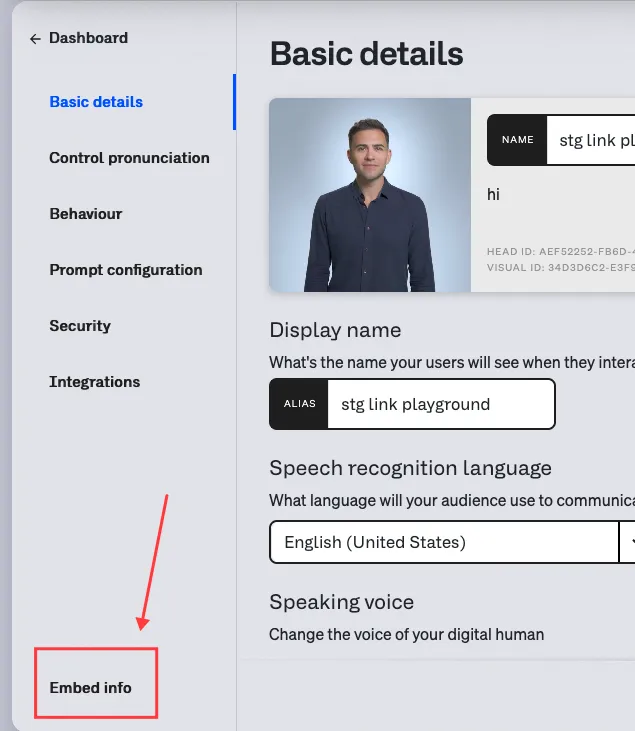
Your public_org_id and public_api_key will remain the same across all heads.
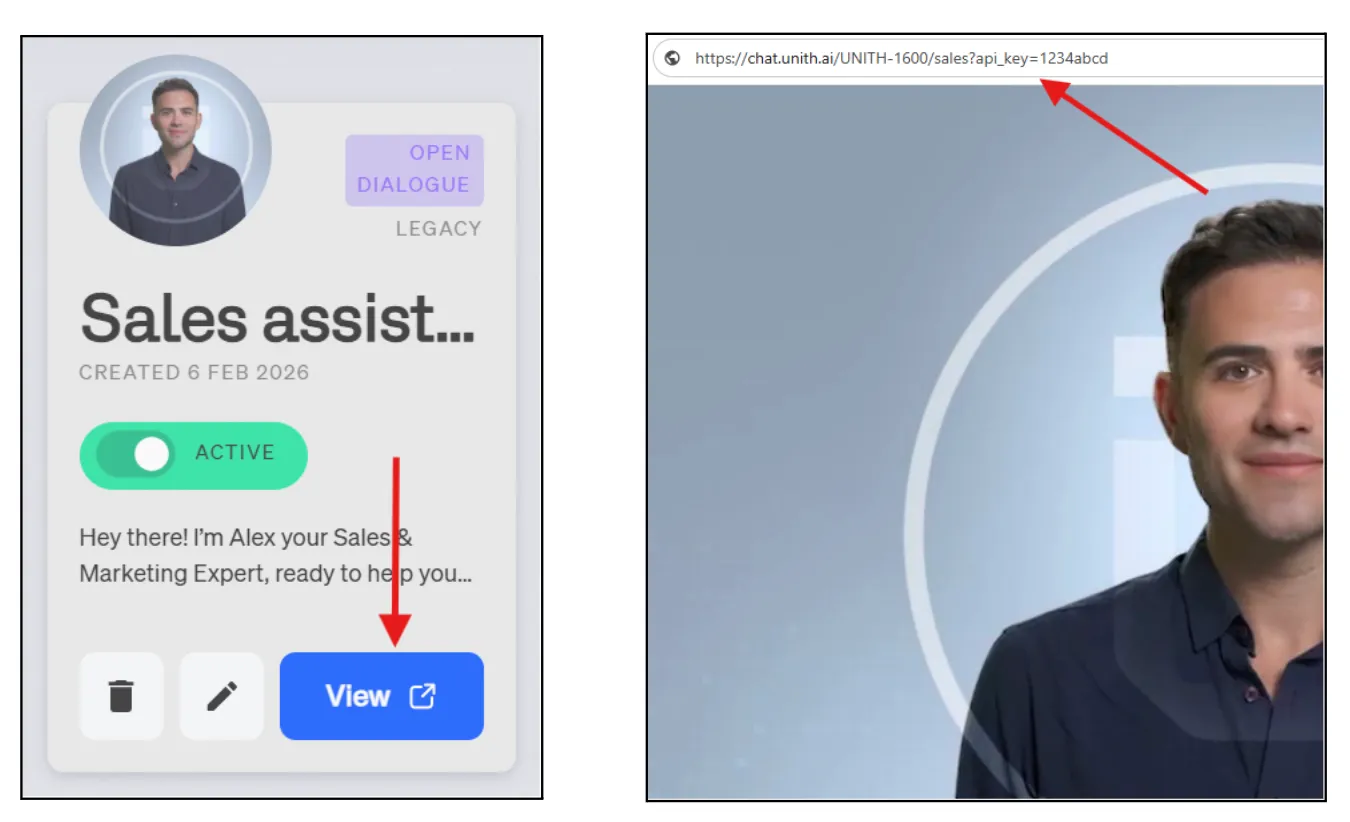
⚠️ Important: API Key ≠ Secret Key
The API Key is public and can be included in visible URLs. The Secret Key is private and must never be exposed. They are completely different credentials. Internal IDs (UUIDs) and public IDs (slugs) can refer to the same resource, but they are NOT interchangeable. Using the wrong type will result in authentication or resolution errors.
Standard HTML Integration
Step 1: Add the Embedding Script
Include the UNITH embed script in your HTML. The defer attribute ensures the script loads after the page content.
Step 2: Add the Widget Element
Choose between fullscreen mode or widget mode based on your integration needs.
Fullscreen Mode (Default)
For fullscreen integration, wrap the <unith-widget> element in a container with defined dimensions.
<div style="height: 400px; width: 100%;">
  <unith-widget
    head_id="yourPublicHeadId"
    org_id="yourPublicOrgId"
    api_key="yourPublicApiKey"
  >
  </unith-widget>
</div>
In fullscreen mode (default), you must wrap <unith-widget> in a container div with a defined height. Without this, the Digital Human interface may not display correctly.
Widget Mode (Floating Button)
For a floating widget that appears as a chat button on your page:
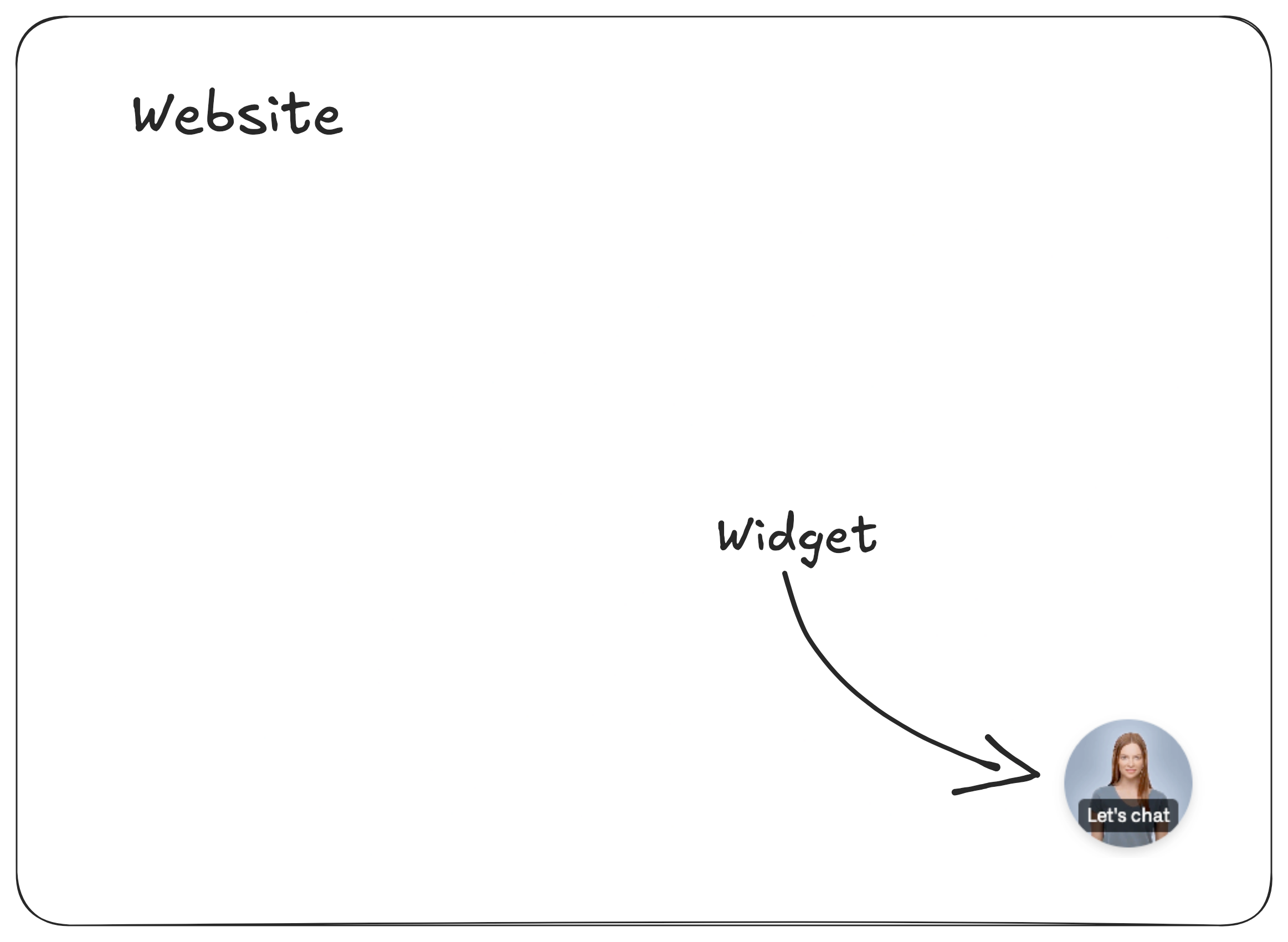
<unith-widget
  head_id="yourPublicHeadId"
  org_id="yourPublicOrgId"
  api_key="yourPublicApiKey"
  variant="widget"
  placement="bottom-right"
>
</unith-widget>
Configuration Attributes
Core Attributes (Required)
These three attributes are required for all UNITH embed integrations:
Attribute | Description | Type | Example |
|---|---|---|---|
public_head_id | Unique identifier for your Digital Human | string | "lola-1234" |
public_org_id | Organization identifier from your UNITH profile | string | "unith-123" |
public_api_key | API key associated with your account | string | "uk_abc123xyz..." |
You can use the public_org_id and public_head_id and public_api_keydirectly from the URL of your digital human: www.chat.unith.ai/orgid-123/headId-123?api_key=1234.
Secondary Attributes (Optional)
Display & Localization
language
Sets the UI display language for interface elements (buttons, labels, system messages).
- Type: string (language code)
- Default: User's browser or device language
- Example: language="en-US"
Supported Languages
Language Code | Language |
|---|---|
ar-AE | Arabic (United Arab Emirates) |
bg-BG | Bulgarian (Bulgaria) |
bn-BD | Bengali (Bangladesh) |
bs-BA | Bosnian (Bosnia and Herzegovina) |
cs-CZ | Czech (Czechia) |
de-DE | German (Germany) |
en-US | English (United States) |
es-ES | Spanish (Spain) |
fi-FI | Finnish (Finland) |
fr-FR | French (France) |
hu-HU | Hungarian (Hungary) |
id-ID | Indonesian (Indonesia) |
it-IT | Italian (Italy) |
ka-GE | Georgian (Georgia) |
kk-KZ | Kazakh (Kazakhstan) |
lt-LT | Lithuanian (Lithuania) |
lv-LV | Latvian (Latvia) |
nl-NL | Dutch (Netherlands) |
pl-PL | Polish (Poland) |
pt-PT | Portuguese (Portugal) |
ro-RO | Romanian (Romania) |
ru-RU | Russian (Russia) |
sv-SE | Swedish (Sweden) |
sk-SK | Slovak (Slovakia) |
sl-SI | Slovenian (Slovenia) |
sr-RS | Serbian (Cyrillic, Serbia) |
th-TH | Thai (Thailand) |
tr-TR | Turkish (Turkey) |
uk-UA | Ukrainian (Ukraine) |
Example
<unith-widget
  head_id="yourPublicHeadId"
  org_id="yourPublicOrgId"
  api_key="yourPiblicApiKey"
  language="fr-FR"
>
</unith-widget>
UI Variant & Placement
variant
Controls the UI display mode.
- Type: string
- Default: "fullscreen"
- Supported Values: "fullscreen", "compact", "widget"
- Example: variant="widget"
placement
Controls widget position when variant="widget". Only applies to widget mode.
- Type: string
- Default: "bottom-right"
- Supported Values:
Value | Description |
|---|---|
"top-left" | Top left corner |
"top" | Top center |
"top-right" | Top right corner |
"bottom-left" | Bottom left corner |
"bottom" | Bottom center |
"bottom-right" | Bottom right corner |
Example - Widget with Custom Placement
<unith-widget
  head_id="yourPublicHeadId"
  org_id="yourPublicOrgId"
  api_key="yourPublicApiKey"
  variant="widget"
  placement="top-right"
  language="en-US"
>
</unith-widget>
auto_open
Automatically opens the widget when a visitor accesses your web page, without requiring a click to expand it.
- Type: boolean
- Default: false
- Applies to: variant="widget" only
- Example: auto_open="true"
auto_open_delay
Sets the delay before the widget auto-opens, in milliseconds. Only applicable when auto_open="true".
- Type: number
- Default: 0
- Example: auto_open_delay="3000" (3 seconds = default value)
<unith-widget
  head_id="yourPublicHeadId"
  org_id="yourPublicOrgId"
  api_key="yourPublicApiKey"
  variant="widget"
  auto_open="true"
  auto_open_delay="3000"
>
</unith-widget>
URL Query Parameter Example
https://stream.unith.ai/{public_org_id}/{public_head_id}?api_key={public_api_key}&variant=widget&auto_open=true&auto_open_delay=5000User Identification & Session Tagging
You can pass a username and a tag when embedding a streaming digital human. Both values appear as dedicated columns in your Conversation Logs Retrievalsession logs, making it straightforward to filter and segment sessions without parsing session IDs.
You can supply these values either as widget attributes or as URL query parameters:
username
- Type: string
- Example: username="alice.johnson"
tag
- Type: string
- Example: tag="campaign-summer2025"
Example
<!-- Widget attribute -->
<unith-widget
  head-id="your-public-head-id"
  org-id="your-public-org-id"
  api-key="your-public-api-key"
  username="alice"
  tag="campaign-summer2025"
>
</unith-widget>
<!-- iframe URL parameter -->
https://stream.unith.ai/publicOrgId/publicHead_id=...&username=alice&tag=campaign-summer2025For full details on filtering logs by username and tag, see Conversation Logs Retrievallink
Speech-to-Text Configuration
stt_provider
Selects the speech recognition provider for voice input.
- Type: string
- Default: "azure"
- Supported Values: "azure", "eleven_labs"
- Example: stt_provider="eleven_labs"
Example
<unith-widget
  head_id="yourPublicHeadId"
  org_id="yourPublicOrgId"
  api_key="yourPublicApiKey"
  stt_provider="eleven_labs"
>
</unith-widget>
ElevenLabs STT Advanced Configuration
The following attributes are only applicable when stt_provider="eleven_labs".
noise_suppression
Enables background noise filtering for clearer voice recognition.
- Type: boolean
- Default: true
- Example: noise_suppression="true"
vad_silence_threshold_secs
Duration of silence (in seconds) required to detect end of speech.
- Type: number
- Default: 1.5
- Range: 0.5 - 3.0
- Example: vad_silence_threshold_secs="1.5"
vad_threshold
Voice Activity Detection sensitivity threshold. Lower values are more sensitive to speech.
- Type: number
- Default: 0.4
- Range: 0.0 - 1.0
- Example: vad_threshold="0.4"
min_speech_duration_ms
Minimum duration (in milliseconds) of audio to be considered speech.
- Type: number
- Default: 100
- Example: min_speech_duration_ms="100"
min_silence_duration_ms
Minimum duration (in milliseconds) of silence between speech segments.
- Type: number
- Default: 100
- Example: min_silence_duration_ms="100"
disable_dynamic_speech_recognition
Take advantage of the elevenlab's automatic language detection. When set to true the speech recognition will only focus on the voice set by languageSpeechRecognition parameter. Learn more about digital human creation here.
- Type: boolean
- Default: false
- Example: disable_dynamic_speech_recognition=true
Complete ElevenLabs STT Example
<unith-widget
  head_id="yourPublicHeadId"
  org_id="yourPublicOrgId"
  api_key="yourPublicApiKey"
  stt_provider="eleven_labs"
  noise_suppression="true"
  vad_silence_threshold_secs="1.5"
  vad_threshold="0.4"
  min_speech_duration_ms="100"
  min_silence_duration_ms="100"
  disable_dynamic_speech_recognition=true
>
</unith-widget>
URL Query Parameter Example
https://stream.unith.ai/{org_id}/{head_id}?api_key={api_key}&stt_provider=eleven_labs&vad_silence_threshold_secs=1&vad_threshold=0.4&min_speech_duration_ms=100&min_silence_duration_ms=100voice_interruptions
Enables users to interrupt the Digital Human during response delivery for more natural, conversational interactions.
- Type: boolean
- Default: false
- Supported STT Providers: Azure, ElevenLabs
- Example: voice_interruptions="true"
How It Works
When voice interruptions are enabled, users can speak while the Digital Human is responding. Upon detecting an interruption, the system automatically crossfades back to the idle state and begins listening to the new user input. The interrupted response is terminated, and the conversation continues with the user's new message.
<unith-widget
  head_id="yourPublicHeadId"
  org_id="yourPublicOrgId"
  api_key="yourPublicApiKey"
  voice_interruptions="true"
>
</unith-widget>
URL Query Parameter Example
https://stream.unith.ai/{public_org_id}/{public_head_id}?api_key={public_api_key}&voice_interruptions=trueVoice interruptions create a more natural conversational flow, allowing users to clarify, correct, or redirect the conversation without waiting for the complete response. However, incomplete inputs may occur if users interrupt mid-thought.
subs_enabled
Enables display of subtitles showing the Digital Human's spoken responses as text.
- Type: boolean
- Default: false
- Example: subs_enabled="true"
<unith-widget
  head_id="yourPublicHeadId"
  org_id="yourPublicOrgId"
  api_key="yourPublicApiKey"
  subs_enabled="true"
>
</unith-widget>
URL Query Parameter Example
https://stream.unith.ai/{public_org_id}/{public_head_id}?api_key={public_api_key}&subs_enabled=trueSynchronization Note: Due to the streaming nature of audio generation and varying speech synthesis speeds, there may be slight timing differences between audio playback and subtitle display.
React / Next.js Integration
For React and Next.js applications, follow these steps to properly integrate the UNITH widget.
Step 1: Load the Embed Script
Use React's useEffect hook to dynamically load the UNITH embed script when your component mounts.
import { useEffect } from 'react';

useEffect(() => {
  // Load the script
  const script = document.createElement('script');
  script.src = 'https://embedded-stream.unith.ai/index.js';
  script.defer = true;
  document.body.appendChild(script);

  return () => {
    // Cleanup: remove script when component unmounts
    document.body.removeChild(script);
  };
}, []);
Step 2: Add the Widget Element
Fullscreen Mode
<div style={{ height: '400px', width: '100%' }}>
  <unith-widget
    head_id="yourPublicHeadId"
    org_id="yourPublicOrgId"
    api_key="yourPublicApiKey"
  >
  </unith-widget>
</div>
Widget Mode
<unith-widget
  head_id="yourPublicHeadId"
  org_id="yourPublicOrgId"
  api_key="yourPublicApiKey"
  variant="widget"
  placement="bottom-right"
>
</unith-widget>
Step 3: TypeScript Configuration (TypeScript Projects Only)
If you're using TypeScript, add type definitions to prevent TypeScript errors.
Create or Update global.d.ts
declare namespace JSX {
  interface IntrinsicElements {
    ['unith-widget']: {
      head_id: string;
      org_id: string;
      api_key: string;
      variant?: 'widget' | 'fullscreen' | 'compact';
      placement?: 'bottom-right' | 'bottom-left' | 'top-right' | 'top-left' | 'top' | 'bottom';
      language?: string;
      username?: string;
      stt_provider?: 'azure' | 'eleven_labs';
      noise_suppression?: boolean;
      vad_silence_threshold_secs?: number;
      vad_threshold?: number;
      min_speech_duration_ms?: number;
      min_silence_duration_ms?: number;
    };
  }
}
Update tsconfig.json
Add the global.d.ts file to your TypeScript configuration:
{
  "include": ["global.d.ts", "src/**/*"]
}
Complete React Component Example
import { useEffect } from 'react';

export default function DigitalHumanEmbed() {
  useEffect(() => {
    const script = document.createElement('script');
    script.src = 'https://embedded-stream.unith.ai/index.js';
    script.defer = true;
    document.body.appendChild(script);

    return () => {
      document.body.removeChild(script);
    };
  }, []);

  return (
    <div style={{ height: '500px', width: '100%' }}>
      <unith-widget
        head_id="yourPublicHeadId"
        org_id="yourPublicOrgId"
        api_key="yourPublicApiKey"
        language="en-US"
        username="current-user"
      >
      </unith-widget>
    </div>
  );
}
Iframe Integration
As an alternative to the custom web component, you can embed the Digital Human using a standard HTML iframe.
Basic Iframe Implementation
<iframe
  src="https://stream.unith.ai/{public_org_id}/{public_head_id}?api_key={public_api_key}"
  width="900px"
  height="400px"
  allow="microphone"
>
</iframe>
The allow="microphone" attribute is required to enable voice input functionality in the iframe.
Customization with Query Parameters
Pass secondary attributes as URL query parameters to customize the iframe embed.
Example with Multiple Parameters
<iframe
  src="https://stream.unith.ai/acme-corp/yourHeadId?api_key=yourApiKey&language=en-US&stt_provider=eleven_labs&username=alice&noise_suppression=true&vad_silence_threshold_secs=1.0&placement=center"
  width="900px"
  height="400px"
  allow="microphone"
>
</iframe>
Query Parameter Format
Parameter | Example Value | Required |
|---|---|---|
api_key | yourApiKey | Yes |
language | en-US | No |
stt_provider | eleven_labs | No |
username | alice | No |
noise_suppression | true | No |
vad_silence_threshold_secs | 1.0 | No |
vad_threshold | 0.4 | No |
min_speech_duration_ms | 100 | No |
min_silence_duration_ms | 100 | No |
voice_interruptions | true | No |
subs_enabled | true | No |
placement | center | No |
Integration Examples by Use Case
Customer Support Widget
A floating widget in the bottom-right corner with user tracking:
<unith-widget
  head_id="support-assistant-id"
  org_id="your-org-id"
  api_key="your-api-key"
  variant="widget"
  placement="bottom-right"
  language="en-US"
  username="customer-12345"
>
</unith-widget>
Fullscreen Product Demo
An embedded fullscreen experience for product demonstrations:
<div style="height: 600px; width: 100%;">
  <unith-widget
    head_id="product-demo-id"
    org_id="your-org-id"
    api_key="your-api-key"
    variant="fullscreen"
    language="en-US"
  >
  </unith-widget>
</div>
Multilingual Educational Platform
A compact widget with optimized voice recognition for education:
<unith-widget
  head_id="education-assistant-id"
  org_id="your-public-org-id"
  api_key="your-public-api-key"
  variant="compact"
  language="es-ES"
  stt_provider="eleven_labs"
  noise_suppression="true"
  vad_silence_threshold_secs="2.0"
  username="student-98765"
>
</unith-widget>
Important Notes
Browser compatibility: Currently, We only support Google Chrome browser.
Microphone Permissions: Users will be prompted to grant microphone access when they first interact with the Digital Human. Ensure your website uses HTTPS, as modern browsers require secure contexts for microphone access.
Script Loading: The embed script (index.js) should be loaded with the defer attribute to ensure it executes after the DOM is fully parsed.
Container Dimensions: In fullscreen and compact modes, always define explicit height and width for the container div. The widget will inherit these dimensions.
TypeScript Support: For TypeScript projects, always add the global.d.ts type definitions to prevent compilation errors with the custom <unith-widget> element.
Query Parameter Encoding: When using iframe integration with query parameters, ensure special characters in API keys are properly URL-encoded.
Username Tracking: The username attribute is automatically included in session IDs and conversation logs, enabling user-specific analytics and tracking.
ElevenLabs STT Parameters: Advanced Voice Activity Detection (VAD) parameters are only applicable when using stt_provider="eleven_labs". These settings will be ignored for Azure STT.
Troubleshooting
Widget Not Displaying
Issue: The <unith-widget> element appears but doesn't render the Digital Human interface.
Solution: Ensure the parent container has defined height and width dimensions. In fullscreen mode, the widget requires explicit dimensions to render correctly.
<!-- Incorrect -->
<unith-widget head_id="..." org_id="..." api_key="..."></unith-widget>

<!-- Correct -->
<div style="height: 500px; width: 100%;">
  <unith-widget head_id="..." org_id="..." api_key="..."></unith-widget>
</div>
Microphone Access Denied
Issue: The Digital Human cannot access the microphone for voice input.
Solution:
- Verify your site uses HTTPS (required for microphone access)
- For iframe integration, ensure allow="microphone" attribute is present
- Check browser permissions and ensure microphone access is granted
TypeScript Errors
Issue: TypeScript reports errors about unknown element <unith-widget>.
Solution: Add the global.d.ts type definitions file as described in the React/Next.js integration section, and ensure it's included in your tsconfig.json.