Identifiers & Credentials
What are you trying to do?
- Embed an avatar in a website or app? Jump to Embedding credentialsJump to Embedding credentials.
- Use the API to create, modify, or manage Heads, Head Visuals, or other resources? Jump to API credentialsJump to API credentials.
Public vs Private - the key distinction
The UNITH platform has two separate sets of identifiers and credentials. They are not interchangeable.
| Public | Private |
|---|---|---|
Used for | Embedding, client-side integrations | Backend API calls, resource management |
Safe to expose? | Yes, can appear in URLs and client code | No, keep in your backend only |
Identifiers | publicOrgId, publicHeadId | orgId, headId, headVisualId |
Credentials | API Key | Secret Key, Bearer Token |
Important: API Key ≠ Secret Key
The API Key is public and can be included in visible URLs. The Secret Key is private and must never be exposed. They are completely different credentials. Internal IDs (UUIDs) and public IDs (slugs) can refer to the same resource, but they are NOT interchangeable. Using the wrong type will result in authentication or resolution errors.
API credentials
Use these when calling the UNITH API from your backend create, modify, or manage Heads, Head Visuals, manage resources, etc.
Authentication
Secret Key Your permanent credential. Used to generate Bearer Tokens. Never expose it outside your backend.
Bearer Token Obtained from your Secret Key. Include it in every API request:
Expires every 7 days — regenerate it using your Secret Key before it expires.
For more details on how to obtain and manage your Secret Key and Bearer Token, see the API User Authentication guideAPI Authentication guide.
Identifiers
Name | Format | What it identifies |
|---|---|---|
orgId | UUID | Your organization |
headId | UUID | A specific Head (avatar) |
headVisualId | UUID | The visual layer of a Head |
You can retrieve all your identifiers with a single API call once you have a Bearer Token:
The response contains everything you need:
{
  "id": "xxxxxxxx-xxxx-xxxx-xxxx-xxxxxxxxxxxx", //your_user_id
  "firstName": "Jane",
  "lastName": "Doe",
  "email": "[email protected]",
  "organisation": {
    "id": "xxxxxxxx-xxxx-xxxx-xxxx-xxxxxxxxxxxx",  //your org_id (UUID)
    "publicId": "your-company-slug",   //your_public_org_id
    "apiKey": "your_public_api_key",
...
}
Once you have your orgId, you can retrieve all your Heads and their identifiers:
The response returns an array of Head objects:
[  {
"id": "xxxxxxxx-xxxx-xxxx-xxxx-xxxxxxxxxxxx",    //Head ID (UUID)
"orgId": "xxxxxxxx-xxxx-xxxx-xxxx-xxxxxxxxxxxx",
"headVisualId": "xxxxxxxx-xxxx-xxxx-xxxx-xxxxxxxxxxxx",
"name": "Your Head Name",
"publicId": "your-head-slug-12345",    //Public Head ID
"orgPublicId": "your-org-slug",
"publicUrl": "https://stream.unith.ai/your-org-slug/your-head-slug-12345?api_key=your_public_api_key",
"language": "en-US",
"isActive": true
}]
Embedding credentials
Use these when embedding an avatar in a website, app, or any client-side context.
The three values you need
Name | What it is |
|---|---|
publicOrgId | Your organization's human-readable slug. Same across all your Heads. |
publicHeadId | The slug of the specific Head you want to embed. |
API Key | Your public key for embedding. Same across all your Heads. |
Where to find them inside UNITH interFace
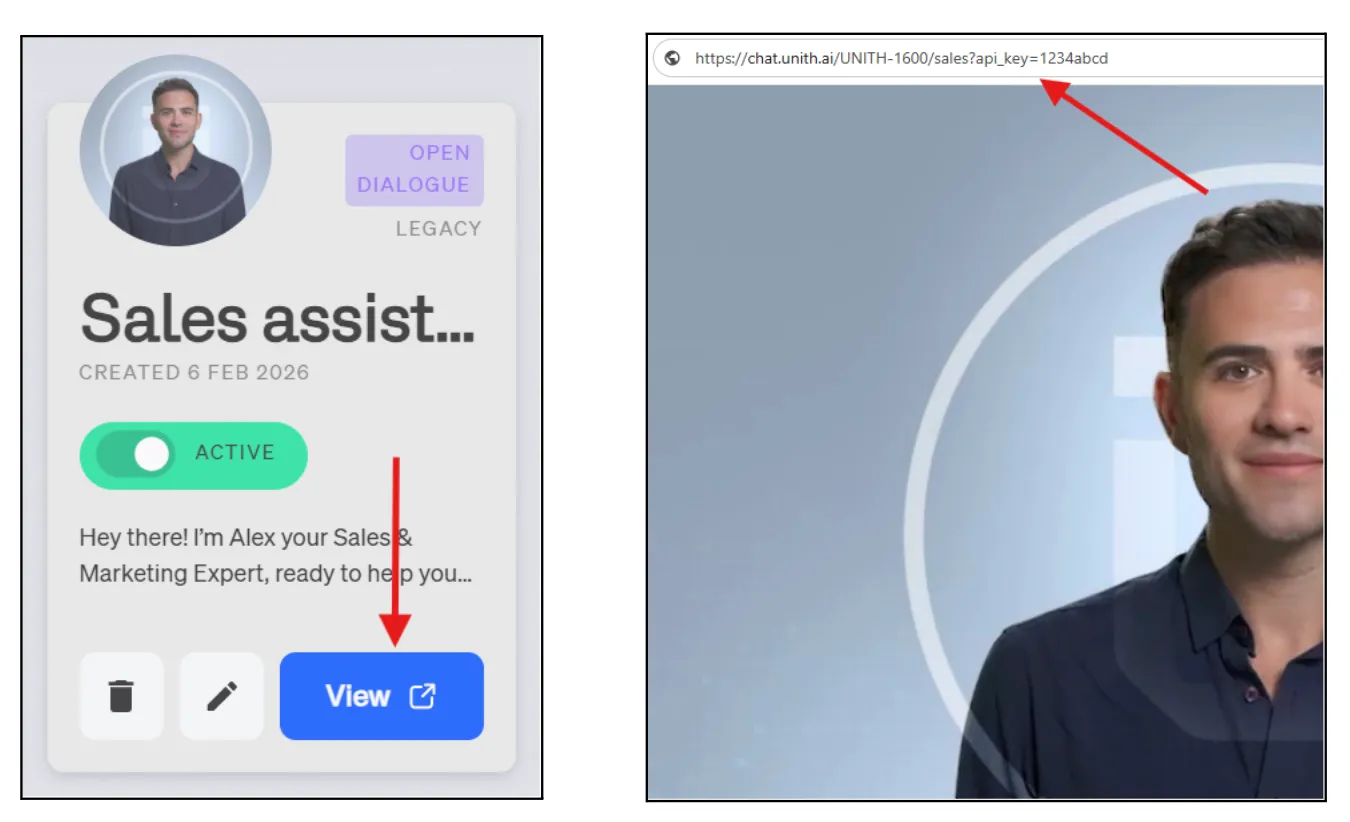
All three values are in your avatar's streaming URL. To get it:
- Open the UNITH dashboard and find your avatar.
- Click View — the browser opens the streaming URL.
- Read the values from the address bar:
Embedding the avatar
For a full guide on how to embed and integrate Digital Humans into your application, see the UNITH Embed Integration GuideEmbedding & Streaming Digital Humans guide.