Expressive Streaming Digital Humans
Overview
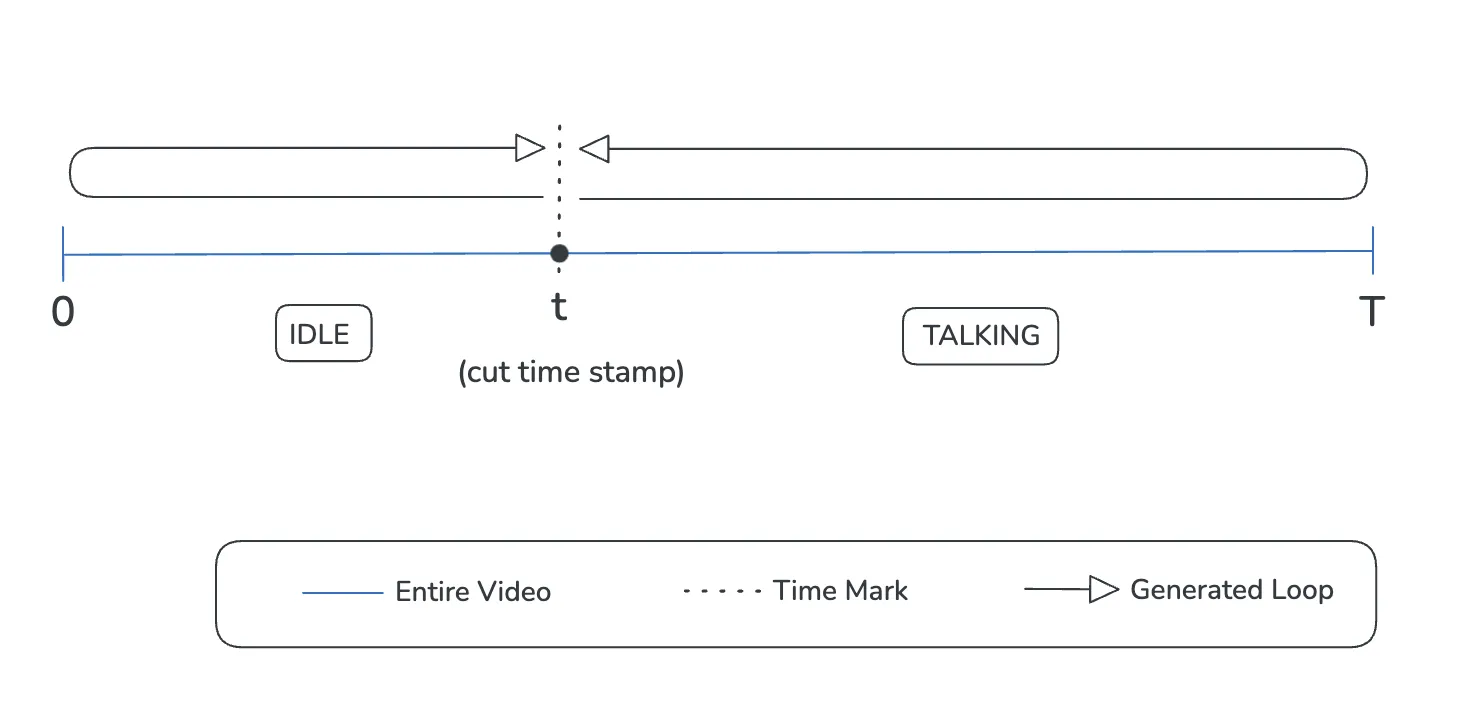
The Two Loops Streaming Mode enables more expressive and natural Digital Human presentations by using separate video segments for idle and talking states. This advanced mode is specifically designed for streaming Digital Humans where audio duration is unknown in advance.
Two Loops mode creates more engaging Digital Humans by allowing dynamic transitions between idle gestures and expressive talking animations.
How Two Loops Streaming Works
Traditional vs. Two Loops Architecture
Traditional Streaming Mode:
- Single idle loop plays continuously
- Talking state uses the same loop with lip-sync overlay
- Limited expressiveness during responses
Two Loops Streaming Mode:
- Separate idle loop (0 to cut timestamp)
- Separate talking loop (cut timestamp to end)
- Smooth transitions between states
- More natural and expressive responses
Video Requirements
Duration
- Maximum video length: 120 seconds
Structure
- Single continuous recording (no manual cutting required)
- First half: Idle state with minimal movement
- Second half: Expressive talking state
- Natural transition at cut_timestamp
Creating a Two Loops Head Visual
To learn about how to create head visual via API, please check this page.
Step 1: Prepare Your Video
Your video should follow these specifications:
Idle State (First Half)
- Subject in neutral pose
- Minimal body and head movement
- Subtle, natural gestures only
- Include one blink in the first 4 seconds
- Include another blink between second 4 and cut_timestamp
- Avoid noticeable movement in first and last frames of this segment
Talking State (Second Half)
- More expressive facial expressions
- Natural hand gestures and movements
- Animated, engaged body language
- Subject appears actively communicating
- Avoid abrupt movements at segment boundaries
The platform automatically handles looping and inversion for both segments to ensure seamless, non-jarring transitions.
Step 2: Determine Cut Timestamp
The cut_timestamp defines where your video transitions from idle to talking state.
Example:
- Video duration: 20 seconds
- Idle state: 0-10 seconds
- Talking state: 10-20 seconds
- cut_timestamp: 10
Guidelines:
- Cut timestamp should occur at a natural transition point
- Ensure smooth motion at the cut point
- Typically set at the midpoint of your video for balanced loops
- Measured in seconds from video start
Step 3: Create Head Visual via API
Endpoint: POST https://platform-api.unith.ai/head_visual/create
Request Body
{
"mode": "two_loops_streaming",
"cut_timestamp": 10
}
CURL Example
curl -X 'POST' \  'https://platform-api.unith.ai/head_visual/create' \
  -H 'accept: application/json' \
  -H 'x-head-video-token-id: yourVideoTokenId' \
  -H 'Authorization: Bearer yourBearerToken' \
  -H 'Content-Type: application/json' \
  -d '{
  "mode": "two_loops_streaming",
  "cut_timestamp": 10
}'
Parameter | Type | Required | Description |
|---|---|---|---|
mode | string | Yes | Must be "two_loops_streaming" |
cut_timestamp | number | Yes | Timestamp in seconds where idle transitions to talking state |
Video Production Best Practices
Idle State Guidelines
Movement:
- Keep body and head movements minimal
- Subtle weight shifts are acceptable
- Natural breathing motion is encouraged
- No dramatic gestures or expressions
Blinking:
- Include exactly one blink in the first 4 seconds
- You can include one additional blink between second 4 and cut_timestamp
- Natural blink timing prevents robotic appearance
- Avoid blinking in the first or last 0.5 seconds of the segment
Talking State Guidelines
Expressiveness:
- Engaged facial expressions
- Dynamic body language
- Subject appears actively communicating
Movement Range:
- More animated than idle state
- Natural conversational gestures
- Avoid extreme or distracting movements
- Maintain professionalism appropriate to use case
Transitions:
- Smooth motion at cut_timestamp boundary
- Avoid abrupt changes at segment start/end
- Natural flow between states
Complete Workflow Example
Step 1: Record Video
- Record 10-second video with subject
- 0-5 seconds: Subject in neutral waiting pose (idle)
- 5-10 seconds: Subject with engaged, helpful expressions (talking)
- Include natural blinks at 2 seconds and 7 seconds
Step 2: Post-Production
- Follow our best practices for video recording
- Export as high-quality video file
Step 3: Upload Video
- Upload video to UNITH platform. Find more info about head visual creation here.
- Receive video token ID
Step 4: Create Head Visual
curl -X 'POST' \  'https://api.unith.live/head_visual/create' \
  -H 'accept: application/json' \
  -H 'x-head-video-token-id: videoToken' \
  -H 'Authorization: Bearer yourBearerToken' \
  -H 'Content-Type: application/json' \
  -d '{
  "mode": "two_loops_streaming",
  "cut_timestamp": 5
}'
Step 5: Configure Digital Human
- Associate head visual with Digital Human
- Configure for streaming mode
- Test idle and talking state transitions
Important Notes
Automatic Loop Handling: The platform automatically manages looping and transitions. You do not need to manually reverse, blend, or stitch video segments.
Cut Timestamp Precision: Set the cut_timestamp at the exact second where your subject transitions from idle to expressive state. Precision is important for smooth state changes.
Video Quality: High-quality source video is essential. Ensure proper lighting, clear edges after keying, and consistent framing throughout the recording.
Blink Timing: Strategic blink placement enhances realism. Include blinks as specified to avoid a static, robotic appearance.
Streaming Mode Requirement: Two Loops Streaming mode only works with streaming Digital Humans. Ensure your Digital Human is configured with streaming: true.
Testing: Always test your Two Loops head visual with actual conversations to verify smooth transitions and natural appearance.
Performance: Two Loops mode provides better expressiveness without significant performance impact, as loops are preprocessed during video processing.