Welcome to the UNITH Docs

This is the central reference for building with and on top of the UNITH platform. Whether you're embedding a digital human, integrating via API, or configuring advanced behabehaviorsviours, you'll find the guides, references, and updates you need here.
The changelog below is kept up to date after every release. We recommend checking it regularly — some updates require action on your end, and we'll always flag those clearly.
Latest Updates
Improved digital human session behaviour Inactivity and timeout handling during digital human interactions has been significantly improved. Both states are now properly coordinated so they no longer conflict with active sessions. As a result, you will no longer see prompts asking whether you are still present while the digital human is in the middle of responding. We have also enhanced greatly the behaviour of established websocket connection.
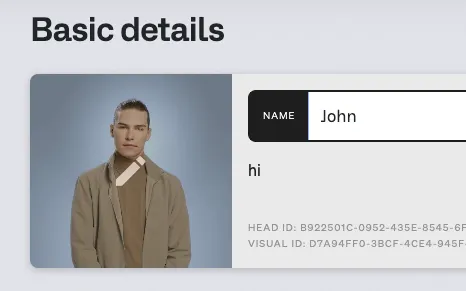
Change the visual appearance of an existing digital human You can now reassign the head visual of a digital human after it has been created. To do this via the interface, open the digital human, click Edit, then hover over the avatar image to access the change option. To reassign a head visual via API, refer to the "Create Head Visual" documentation.
Clearer prompt guidance in the interface Warning messages across the interface have been updated to provide more actionable guidance when building digital human prompts.
API key required when setting a custom LLM When configuring a custom language model, you are now required to provide your own API key. This ensures that custom LLM integrations are properly authenticated from the start.
What do you need to do?
To reduce potential regressions these new changes may introduce in your application, we have released them in a candidate version for you to test. We do not advise replacing your current embedded link with this version. Instead:
- Use this candidate version in a sandbox environment
- Test the impact of these new changes in your application
- If needed, make necessary modifications
- Once we release the new version on February 27th, you can integrate these changes into your application
Links:
https://embedded-candidate-release.unith.ai/dist/bundle.js https://embedded-candidate-release.unith.ai/dist/bundle.css
The current production bundles will remain available, but they will be unsupported and no longer maintained.