Welcome to the UNITH Docs

This is the central reference for building with and on top of the UNITH platform. Whether you're embedding a digital human, integrating via API, or configuring advanced behabehaviorsviours, you'll find the guides, references, and updates you need here.
The changelog below is kept up to date after every release. We recommend checking it regularly — some updates require action on your end, and we'll always flag those clearly.
Latest Updates
Improved response speed - We've significantly improved response speed for longer responses. No action is needed on your end — you should automatically see better performance, particularly for longer digital human responses. This improvement applies across all TTS providers we currently support.
Widget auto-open - If you're using widget mode, you can now configure the widget to open automatically, with control over the delay before it opens. This is set via a simple additional parameter. See full documentation here.
Widget focus fix - We've resolved a previously known issue where the embedded widget could conflict with focus behaviour on the parent page. Along with this, several other widget stability fixes have been shipped.
Contact modal Update - The contact modal in interFace has been redesigned, making it easier for potential clients to get in touch with UNITH.
New languages support - We've added support for three new languages: Turkish, Swedish, and Finnish. If you need a language that isn't yet supported, please get in touch with us.
Improved digital human session behaviour Inactivity and timeout handling during digital human interactions has been significantly improved. Both states are now properly coordinated so they no longer conflict with active sessions. As a result, you will no longer see prompts asking whether you are still present while the digital human is in the middle of responding. We have also enhanced greatly the behaviour of established websocket connection.
Change the visual appearance of an existing digital human You can now reassign the head visual of a digital human after it has been created. To do this via the interface, open the digital human, click Edit, then hover over the avatar image to access the change option. To reassign a head visual via API, refer to the "Create Head Visual" documentation.
Clearer prompt guidance in the interface Warning messages across the interface have been updated to provide more actionable guidance when building digital human prompts.
API key required when setting a custom LLM When configuring a custom language model, you are now required to provide your own API key. This ensures that custom LLM integrations are properly authenticated from the start.
IN-PRODUCT RELEASE NOTES
We want to make sure you're always aware of what's new. After each deployment, you'll be able to see a summary of newly released features directly from the interFace.
HEAD VISUAL ORGANISATION
We're continuing to grow the avatar catalogue steadily, and with more visuals comes the need for better organisation. We're improving how head visuals are structured and browsed in the interFace so the expanded catalogue stays manageable and easy to navigate. To learn more, check out our head visual documentation.
VOICE INTERRUPTION
You can already stop a digital human's response with the stop button. We're now adding the ability to interrupt via voice — so you can cut in naturally, mid-response, without reaching for a button. This will be configurable per individual head ID, giving you fine-grained control over where and how interruption is enabled. To learn more, please check this link.
CUSTOM DATA TAGS
You can now label each digital human deployment with a custom tag. That tag travels through the entire system and appears in your usage logs, so you can finally tell apart which website, campaign, or platform is driving which activity.
This gives integrators a clean, low-friction way to segment usage by deployment, campaign, platform, or whatever distinction is relevant to your setup. Please see full details here.
OTHER
- From a security standpoint, we have improved the login and sign-up flows by introducing token expiry — authentication tokens now expire within 10 minutes for login and 30 minutes for sign-up.
- Digital humans created in legacy mode are no longer accessible via direct URL manipulation, closing an unintended access path.
- The custom words tab in interFace Digital Human's edit now includes a short warning to help users prevent some common issues.
- Fixed DH edit error where the user would sometimes see the pending changes dialog incorrectly after a save error.
We've shipped a significant platform update across the UNITH interface and API. Here's what's changed.
STREAMING IS NOW THE DEFAULT
Streaming mode is now active by default for all new digital humans, both from the interFace and via the API. This includes updated default prompts and template adjustments to ensure optimal behaviour out of the box. If you were previously enabling streaming manually, no action is needed — it just works.
NEW: INTEGRATIONS TAB
We've added a dedicated Integrations tab in the interface. From there you can:
- Retrieve and configure tool calling
- Set up MCP integrations
- Switch the underlying LLM model
This brings advanced configuration into the UI without requiring API-level access.
VOICE MODAL IMPROVEMENTS
The voice selection modal in interFace now includes a clearer filtering experience. You can also manually enter a private voice ID — useful if you're working with custom or provisioned voices outside the standard catalogue (e.g. private voices).
DIGITAL HUMAN: NAME AND ALIAS NOW SEPARATE IN INTERFACE
When creating a digital human, you can now set the head name and the alias independently. This gives you more flexibility in how digital humans are labelled internally versus how they appear to end users.
STOP BUTTON & RESPONSE INTERRUPTION
Users can now interrupt an active response with a stop button. This gives end users more control over interactions without needing to wait for a full response cycle to complete.
STREAMING FEATURE PARITY
With streaming now the default, we've restored and expanded several features that were previously only available in non-streaming mode:
- High demand pop-up
- Inactivity behaviour
- Browser recommendation prompt
- Automatic browser language detection — the digital human will now match the user's browser language automatically, without any manual configuration
DATA PIPELINE & ENVIRONMENT INFRASTRUCTURE
We've deployed a fully updated data pipeline with proper environment separation. This gives us significantly better tooling for testing, debugging, and safe iteration before changes reach production. There was a small change in the endpoints path: New base URL: https://api.data.unith.ai/ Path: Remove /api/ from any existing paths Before: https://7bdt5ca661.execute-api.eu-west-1.amazonaws.com/api/sessions/... After: https://api.data.unith.ai/sessions/...
THREE NEW AVATAR VISUALS
We've expanded our head visuals catalogue with three new avatars.
Overview
This release establishes streaming as the default mode for new digital humans created through the interface. The API contract is unchanged for the next 3 weeks; existing integrations will continue to function without modification.
Voices
- Unknown accent support: Voice preview now functions correctly when the accent is unrecognized or undefined.
- Microsoft Azure streaming support: Azure TTS is now fully supported in streaming mode.
- Voice modal redesign: The voice selection modal in the interface has been updated with infinite scroll for improved usability.
Streaming
- Two-loop support: Streaming digital humans now support two-loop configurations.
- Suggestions in streaming: Suggestion prompts are now supported in streaming mode.
- Unified creation pipeline: The complete streaming logic is integrated. Both legacy (synth) and streaming digital humans can be created via API. Each mode's dependencies are resolved automatically.
- Mode conversion: Digital humans can now be converted between legacy and streaming modes bidirectionally.
Interface
- Prompt validation: An error is now raised when curly brackets are used in contexts where they are not permitted.
- Dashboard distinction: Legacy and streaming digital humans are visually differentiated in the dashboard. Each type has a dedicated edit flow, including separate configurations for the security tab and allowed domains.
- Updated creation flow: The digital human creation flow has been adjusted to align with streaming head requirements.
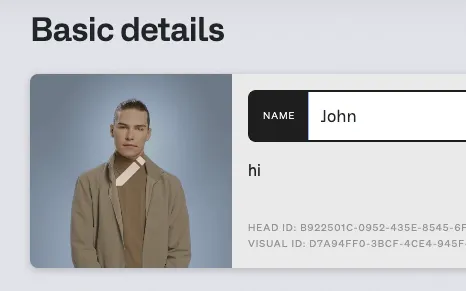
- Head Visual ID visibility: The Head Visual ID is now surfaced in the Basic Info section of the digital human edit view.
- Redesigned embed components: Embed components have been redesigned and now link to updated documentation.
Digital Human Frontend
- Suggestions in streaming: Suggestion support is now available in streaming mode.
- ElevenLabs fixed language support: ElevenLabs voice provider now supports fixed language configuration.
Documentation Updates
The following documentation has been added or significantly updated alongside this release:
- Embedding streaming digital humans, including SDK usage
- Two-loop creation in streaming mode
- Digital human creation and update flows
- Head Visual creation
- Custom voice connector creation
- Webhook API reference
- Advanced conversation settings (plugin configuration, LLM model switching)
- Video recording guidelines
- Legacy documentation updated to reference streaming equivalents
We're introducing widget mode for embedded digital humans. To avoid conflicts with website builders' global CSS classes, we've prefixed our CSS classes with a unique identifier. All class names remain the same, but they now include the prefix "unith-". For example, the original class ".video" is now ".unith-video".
We expect to deploy these changes to production as early as February 27, 2025.
- All CSS classes have been renamed with the "unith-" prefix. (".classX" -> ".unith-classX"
- If you've customized any CSS, please update your code, as the original class names will no longer function.
- We've redesigned the default view layout for digital humans. To improve consistency across views and optimize screen usage, we've expanded the video component to fill the screen.
- For an enhanced mobile experience, we're prioritizing the digital human's fullscreen view. The chat remains accessible via a dedicated button.
- We've updated the microphone behavior to allow users to manually start and stop recording. This gives users control over the length of their audio recordings.
What do you need to do?
To reduce potential regressions these new changes may introduce in your application, we have released them in a candidate version for you to test. We do not advise replacing your current embedded link with this version. Instead:
- Use this candidate version in a sandbox environment
- Test the impact of these new changes in your application
- If needed, make necessary modifications
- Once we release the new version on February 27th, you can integrate these changes into your application
Links:
https://embedded-candidate-release.unith.ai/dist/bundle.js https://embedded-candidate-release.unith.ai/dist/bundle.css
The current production bundles will remain available, but they will be unsupported and no longer maintained.
API & Integrations
- Choose Your Own LLM – Now natively available via API—integrate your preferred AI model effortlessly. Want to choose your LLM provider like Groq or OpenAI? No problem!
- Agents & Automation – via our API, you can now create agentic Digital Humans. Imagine a Digital Human automating your workflow, like booking meetings in your calendar.
- Real-Time Video-Only Component – Build your own Digital Human Conversation Interface by using a new realtime video-only component.
- Domain Whitelisting – There is now greater control over where your Digital Humans can be deployed and accessed.
Conversational experience
- Improved Performance – we’ve updated our out-of-the-box conversational engine, bringing improved speed and accuracy to your conversations.
- Fresh UI Reskin – A cleaner, more intuitive front-end.
interFace
- Voice Selection Simplified – Click-to-select voices directly within the UI, and see how they have been scored for speed.
- We’ve heard your feedback about more easily tracking knowledge base version control. With document name visibility, you can now see document names clearly to keep your knowledge base up-to-date.
We are excited to announce a soft reskin of our current digital human user-facing frontend, enhancing the look and feel while maintaining its core functionality. Below is a list of changes that will be implemented starting December 10th.
These updates are designed to improve user interaction and overall aesthetics. To assist our integrators in preparing for these changes, we are providing bundles (css and javascript) that allow you to test the new interface locally. This ensures that your implementation remains seamless and fully functional.
Please review the changes below and utilize the provided bundles to confirm everything aligns with your current setup.
Please note that this update may disrupt the current CSS files you are using.
While it's possible to continue using the legacy bundles, be advised that support for them will be discontinued, leaving their use at your own risk.
- Chat component
- Loading animation (lds-ellipsis) is now only used in “x is thinking…”. It’s been replaced by dot-ellipsis elsewhere.
- Timestamps and feedback now belong inside .timestamp-container.
- The .timestamp container we had wrapping the actual timestamp has been renamed to .timestamp-wrapper so it doesn’t interfere while using global styles
- Thumbs up/down now wrapped in .thumbs-container
- Input/suggestion box
- Added .info-bar container where “x is waiting for a response” is now located
- Background now covers the input box, info bar and suggestions, since it’s a gradient it may not be fully overriden by setting the background-color only
- Suggestion number is now wrapped in a div (.index)
- The previous behavior slid the suggestions under the input box so the top was still visible. This has been updated so it’s completely hidden using display:none while the dh is answering.
- Media controls
- Controls are moved to the top of the input box in the fullscreen version, but in mobile view they sit on top of the video
- Fullscreen is now located in the control bar
- A frosted filter is applied using the ::after selector
- Textual changes
- Chat -> Select an option
- Other
- A number of other css changes.
- Live tag was completely changed
- Fonts have been updated, now the default font should be Sohne but can still be overriden using the data-font attribute.
To reduce potential regressions these new changes may introduce in your application, we have released them in a candidate version. We do not advise replacing your current embedded link with this version. Instead:
- Use this candidate version in a sandbox environment
- Test the impact of these new changes in your application
- Make necessary modifications
- Once we release the new version on December 10th, you can integrate these changes into your application.
Links:
To facilitate the process, the following code snippet, incorporating the required modifications, is provided for your testing purposes prior to the live deployment.
<!-- JavasScript bundle -->
<script defer src="http://embedded-candidate-release.unith.ai/dist/bundle.js"></script>
<!-- CSS bundle -->
<link rel="stylesheet" href="http://embedded-candidate-release.unith.ai/dist/bundle.css" />
Effective December 10th, the production environment will be updated with the re-skinned content. The legacy version will be discontinued but will remain available via the following link:
Here’s what’s new:
User Experience Enhancements
- Voice Selection: It is now easier to filter through and find voices from the growing voice library.
- Voice Speed: Selected voices now includes “performance” ranking to help you select the fastest voice generation option.
- Audio preview for Video Generation Mode: Preview audio for your text before generating the final video.
- Direct download in Video Generation Mode: Download generated videos directly to your device.
- Document Upload: Uploaded files now display the file name, confirming that the desired document has been successfully uploaded.
- Confirmation modals: Receive confirmation before auto-generating or restoring suggestions.
- Character limit on suggestions: Added for improved organization and readability.
- Enhanced voice preview controls: Control pronunciation in the voice preview.
Administration
- Usage reports: Access usage reports in your account overview.
Dashboard Improvements
- Digital Human objective visibility: See the type of digital human (DH) on your dashboard at a glance.